Cam4 FAQ
  • Menu "primary_navigation" not defined.

Cam4 FAQ

Find answers and help fast

Your Account

How do I change my username?

Unfortunately user names cannot be changed. If you wish to change your user name you will need to create a new account with an email address you have not used previously with Cam4.

NOTE: Gold memberships are non-transferable. If you wish a new user name you will need to contact the billing processor and cancel the existing membership. If there is still time on that membership you will not be able to purchase a new gold membership until it expires unless a different credit card is used.

Last Updated: 11 years ago

By Peter Willhelm

Tags: change username

Forgot your Cam4 password?

If you forget your Cam4 password you will need to request a password reset.

  • Click on the forgot password link below the login box or click here.

You must remember the primary email address on file to receive the reset email. If you cannot remember the email address used you will need to create a new account as Customer Service does not have the ability to provide you with this information.

Please be sure that you have added CAM4 to your safe sender list so that emails sent to your email account do not wind up in the spam folder or get deleted.  Information on white listing can be found here: https://www.cam4.com/faq/whitelist

Last Updated: 8 years ago

By Peter Willhelm

Tags: forgot password, password reset

How do I delete my account?

  • Please log in to your CAM4.com account.
  • Click your circular profile avatar located in the upper right of your screen.
  • Select My Account within the drop-down menu
  • Select the Account Settings tab and then click on the button labeled Account
  • Below Account Info, click on the Delete Account button

The deletion of a CAM4 account is permanent. To create a new account, you will need to use an email address that is not associated with any other CAM4 account.

PLEASE NOTE:

  1. If you have a Gold membership, make sure you contact your payment processor and cancel the membership prior to deleting your account.
  2. If you are a broadcaster, make sure you have cashed out all tokens before deleting your Cam4 account.
Last Updated: 3 years ago

By Chris

Tags: delete account

How do I change my password?

To change your password, you will need to do the following:

  1. Click on your circular profile avatar located at the upper right of your screen.
  2. Choose My Account within the drop-down menu
  3. Select the middle top tab labeled Account Settings and then click on the Security button
  4. Scroll down to Manage Password
  5. Enter your current password followed by entering your new password
  6. (IMPORTANT: Do NOT use special characters or you will not be able to log in, and your account will become void.)
  7. Enter your new password again and confirm.
  8. Click Change Password and you’re done.

For forgotten passwords, please use the Forgot login information link on the Cam4.com website login area. This will send an email that contains a link allowing you to reset your password.

NOTE: Here are some tips on choosing a good password.

  • Avoid obvious passwords – for example “password”, “your name”, “12345”, “qwerty”.
  • Don’t use passwords that are based on personal information that can be easily accessed or guessed.
  • Don’t use words that can be found in any dictionary of any language.
  • Use both lowercase and capital letters. (Passwords must contain a minimum of 1 upper and 1 lower case letter)
  • Use a combination of letters and (Passwords must contain a minimum of 1 number)
  • Passwords must be between 6 and 128 characters long
Last Updated: 3 years ago

By Peter Willhelm

Tags: change password

How do I change my email address?

You can change your email address by doing the following:

  • Log into Cam4. Click your profile avatar located in the upper right of your screen
  • Click on My Account within the drop-down menu
  • Select the upper middle tab labeled Account Settings
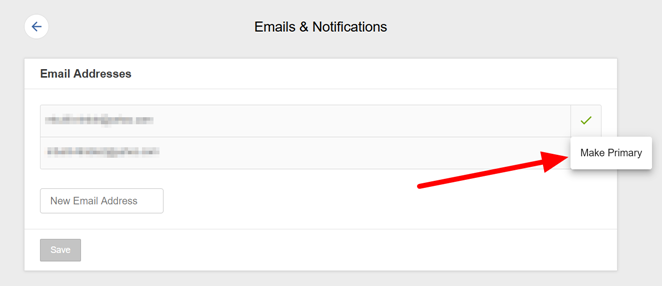
  • Click on the Emails & Notifications button
  • Enter your new email address and click Save
  • You will be prompted to enter your Cam4 login password
  • A verification email will be sent to your original email inbox to verify the change
  • To make the email your new primary account email address, you must click on the three dots located to the right of the new email address entered. Select Make Primary. This can only be done once any new account email changes have been verified as stated above.

This will now be your Cam4 account’s new primary email address.

Last Updated: 3 years ago

By Chris

Tags: change email address, new email address

  • ← Previous
  • 1
  • 2
  • English
    • Danish
    • Dutch
    • French
    • German
    • Italian
    • Norwegian
    • Polish
    • Portuguese (Brazil)
    • Romanian
    • Russian
    • Spanish
    • Spanish (LA)
    • Swedish

Categories

  • Broadcasting (39)
    • Moderation Tools (1)
  • Cam4 Features (16)
  • General Questions (1)
  • Getting Paid (14)
  • Getting Started (7)
  • Gold Membership (5)
  • Online Safety (7)
  • Studios (3)
  • Technical (7)
    • Your mobile device (1)
  • Tokens (9)
  • Video Tutorials (1)
  • Your Account (15)

Legal

  • Terms & Conditions
  • Privacy Policy
  • Statement of Rights and Child Protection

Copyright 2012. Powered by WordPress