Fan Club FAQ

What is a Fan Club?

A Fan Club is a monthly subscription that lets you directly support your favorite performer. You’ll get exclusive access and extra perks — and help them earn more!


What do I get for joining a Fan Club?

Once you click, you’ll see a pop-up showing what you’ll get, which may include:

  • Exclusive content (photos, videos, galleries)
  • Unlimited private messages (some broadcasters may charge extra)
  • Free Spy mode access during Private Shows
  • A special chat badge to show off beside your username
  • Priority status in their inbox
  • Discounted Fan-only content prices
  • The performers appreciation for your direct support!

How much does a Fan Club cost?

Each performer sets their own price. Ranging from $1 per month,all prices are shown in USD at checkout.

You’ll see the price clearly before you subscribe. Some performers may offer bonus content or perks based on their Fan Club level.

Please note: Taxes will be added to the performer fee as applicable ( depending on your location)


How do I pay?

You can pay using your credit card (via our secure partner, Segpay). That’s the only way to subscribe to a Fan Club.

Bonus: When you pay by card, the performer gets a higher payout (80% of your payment goes directly to them!).

CAM4 will not appear on your credfit card statement to maintain your privacy


Does my subscription rebill automatically?

Yes, Fan Clubs are monthly subscriptions that rebill automatically every 30 days. You’ll be charged using the same credit card unless you cancel.


Will I be notified before I’m charged?

You won’t receive a reminder email before rebilling, but you can check your active subscriptions and billing dates anytime by going to:

My Account > Payments & Subscriptions > Fan Clubs


What happens if the performer changes their price?

If a performer increases or decreases their Fan Club price:

  • Your current subscription price will stay the same as long as your subscription remains active.
  • If you cancel and resubscribe later, you’ll be charged the new price.
  • You’ll receive an inbox message if your price is ever affected by a change.

What happens if the performer deletes their account

In the event of a performer deleting their account your subscription will be canceled


How do I cancel my Fan Club subscription?

You can cancel anytime from your account:

My Account > Payments & Subscriptions > Fan Clubs > Cancel

Your access will continue until the end of the billing cycle.


What happens if my card fails or expires?

If a payment fails, you’ll be prompted the next time you visit the site to update your payment method. Easy as pie — no need to contact support.


Is my payment information safe?

Yes.Segpay, a trusted and secure billing provider, processes all payments. CAM4 never sees or stores your credit card details.


Where can I view my subscriptions and charges?

Head to:

My Account > Payments & Subscriptions

You’ll see a full list of your active subscriptions and recent charges.


How can I tell if someone is part of a Fan Club?

In chat, Fan Club members will show a special blue star badge next to their username. It’s a symbol of support — and a bit of clout!


Need Help?

If you have any questions or run into issues, our support team is just a click away. Reach out via email anytime! help@cam4support.com

What are CAM4 Browser Notifications?

CAM4 Browser Notifications let you know when broadcasters you follow are broadcasting live, so you never miss them in action.

If one of the broadcasters you follow is broadcasting when you come online or starts broadcasting while you’re online, a notification will appear in your browser. You can click it to start watching the show easily.

How do I enable CAM4 Browser Notifications?

Browser Notifications are enabled by default. Just follow some broadcasters and you’ll be notified when they start performing!

Once you see a notification for the first time, your browser will ask if you accept desktop notifications.

Are CAM4 Browser Notifications active when I’m not on CAM4?

No, you will only receive CAM4 Browser Notifications when you have CAM4 open in a browser window and are logged in to your account.

However, if you accept desktop notifications, you will receive CAM4 Browser Notifications while surfing the web, reading emails, or using any other application on your computer, provided CAM4 is open in a browser.

Do the notifications repeat?

No. Notifications for the same broadcaster aren’t repeated, so that you won’t be spammed by unwanted messages.

How do I disable CAM4 Browser Notifications?

Disabling Browser Notifications depends on the browser you use:

Safari:

  • Click Safari in the toolbar at the top of the screen.
  • Select Preferences.
  • Switch to the Websites tab within the Preferences pop-up window
  • Scroll down and open the Notifications settings menu
  • Disable the checkbox — Allow websites to ask for permission to send notifications

Chrome:

  • Open Chrome and click on the three dots in the upper-right corner
  • Select Privacy and Security on the left, and then click Site Settings
  • Scroll down to Permissions and select Notifications
  • Disable or adjust Chrome notifications in this area

Firefox:

  • Click the padlock in the address bar.
  • Click the arrow in the Site Information drop-down panel.
  • Click More information in the next panel to bring up the Page Info Window
  • Click the Permissions tab.
  • Under Send Notifications, select Block

Cam4 Group Shows

Group Shows let performers give a more exclusive, private experience to any viewers who buy a ticket during a regular broadcast.

Have something really kinky planned? Want to reward tipping viewers with an extra special performance? You can use your regular show as a preview and save the hottest parts for anyone who buys tickets to the Group Show.

How does a Group Show start?

During a regular show, performers can offer a Group Show by setting the ticket cost, a token goal and a time limit. If the token goal is reached within the time limit, ticket holders are taken to a private room with exclusive video, audio and chat.

Viewers who did not buy a ticket are taken to a separate chat room without audio or video – just like a regular Private Show. These viewers may join the Group Show at any time by purchasing a ticket.

How much do Group Shows cost?

Broadcasters can choose to set the price of a Group Show ticket at 10, 25, 50 or 100 tokens.

What if I buy a ticket but the token goal isn’t reached?

Broadcasters may choose to either start the show for the viewers who did buy tickets or cancel the show if the token goal is not reached within the time limit.

Ticket holders are immediately refunded if a show is cancelled

How long are Group Shows?

Broadcasters can choose to set the length of their show from 5, 10, 15, 20, 25 or 30 minutes. The length of a Group Show can be extended at any time, but cannot be shortened.

Viewers are refunded if a performer ends their show before the set time.

What if performers leave before the show is over?

Viewers are refunded if a broadcaster leaves their show and does not return to complete it within 5 minutes.

What if performers get disconnected?

If a broadcaster is disconnected during a Group Show, they will be able to reconnect to continue the show 3 times before the show is cancelled and viewers are refunded.

What happens if I leave a Group Show?

You may rejoin a Group Show at any time while it is in progress after buying a ticket. You’re free to return after checking out other rooms or getting disconnected.

Remember that the Group Show continues while you’re gone. Don’t miss out!

Do the tips I send during a normal show count toward a Group Show ticket?

Yes. Once a broadcaster sets a ticket price for a Group Show, any tips you send count toward the cost of the ticket. You will automatically get a ticket to the show if you send tips equal to the set ticket price.

However, any tips you may have sent before the broadcaster began selling tickets to a Group Show do not count toward the ticket price.


Cam4 gifts

Cam4 Gifts are virtual presents that can be purchased by members and sent to broadcasters as a more fun and personal alternative to tipping. Each gift has an attached token value that is added to your token balance when you receive a gift – receiving a cute Message in a Bottle is the same as receiving a 100-token tip, for example:

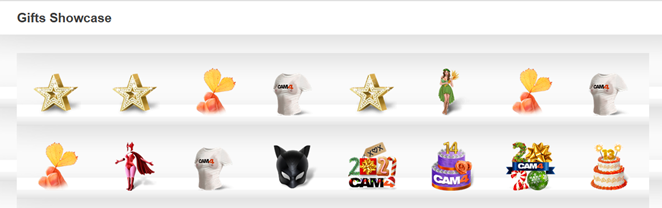
Your gifts are displayed within a virtual Gift Showcase located on your Cam4 profile page. Here, members can view all your gifts – maybe to see the gifts they have sent you on display, or to see how big of a gift they’ll need to send you to stand out!

Members can choose gifts that suit their favorite broadcasters from the wide selection available in the Cam4 Gift Marketplace, making tipping feel more personal and intimate. When sending a Cam4 gift, you have the option to send it anonymously or include your Cam4 name.

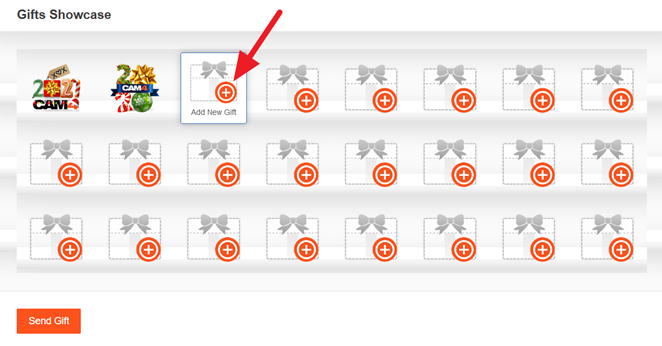
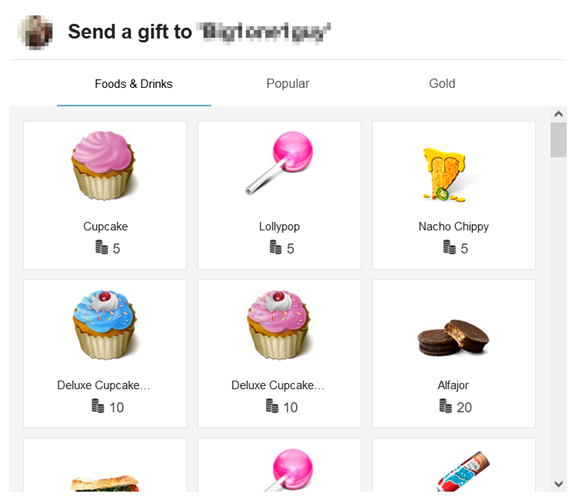
To send a Cam4 gift, go to the profile page of the performer you wish to give a gift.  Scroll to their Gifts Showcase area and click the circular plus icon. This will display the Cam4 Marketplace, from which you can choose the gift you’d like to send. You’ll be able to choose from a large variety of Cam4 gifts, all sortable by category, theme, or price.

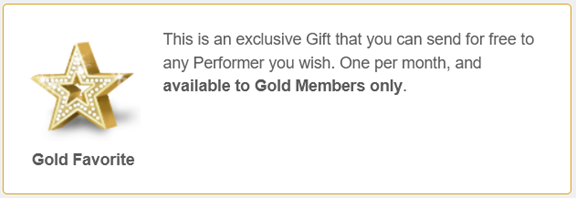
Gold members are given a free exclusive Star gift each month which can be sent to a favorite broadcaster. These star gifts are simply nice gestures and have no token value.

FAQ

What happens when I receive a gift?
Gifts are sent along with a personal message and a token value, which will be added to your token balance. The gift will be displayed, along with the name of the sender and the date sent, on your profile page.

Where are gifts displayed on my profile page?
Gifts are displayed in a virtual display case in a new section of your profile, “My Gifts”. Members can view your gifts and send you new gifts from this section.

How long will the gifts I receive be displayed on my profile page?
Gifts are displayed for 30 days.

Will receiving gifts from viewers result in receiving fewer tokens?
No! Each gift has a token value that you earn when you receive the gift, making gifting a fun alternative to sending tokens.

Cam2Cam – Broadcaster FAQ

Do I earn more tokens by using Cam2Cam?

Cam2Cam is a free feature – there is no added token cost for enabling Cam2Cam.

However, like all features on Cam4, you may decide on your own token price in the form of a tip or Cam4 Gift as a cost to accept Cam2Cam requests from viewers.

Cam2Cam may also earn you more tokens by keeping viewers engaged in your Private Shows, which earn you tokens per minute.

How do I enable Cam2Cam for my Private Shows?

Cam2Cam requests are enabled by default in your Private Show Settings.

cam2cam settings


To disable or re-enable Cam2Cam, uncheck the box in Private Show Settings.

What can spies see during a Cam2Cam Private Show?

During a Cam2Cam Private Show, your spies can still see your video, but cannot see the video of your Cam2Cam viewer.

Spies cannot hear audio for either you or your viewer.

How do I accept Cam2Cam requests?

If you have Cam2Cam enabled, viewers will be able to make Cam2Cam Private Show Requests in the same way normal Private Show Requests are made.

Pending Request

The pop up for the Private Show Request will specify whether Cam2Cam has been requested.

Cam2Cam Popup


 Viewers may also request Cam2Cam mode during a regular Private Show. You will receive a new request notification in this case.

Cam2Cam Request

After clicking accept, Cam2Cam mode will begin.

Can I use Cam2Cam in Private Cam Mode?

Cam2Cam is restricted to Private Shows currently, but will be expanded to Private Cam Mode in the future!

Cam2Cam – Viewer FAQ

What is Cam2Cam?

Cam2Cam lets you interact with broadcasters on a whole new level – live on cam.

Request a Cam2Cam Private Show to experience live video chat with your favorite broadcaster in the privacy and safety of a Cam4 Private Show.

Cam2Cam Private Shows include full audio and video, so broadcasters can see and hear you just as well as you can see and hear them!

What does Cam2Cam cost?

Cam2Cam is a free feature – there is no additional token cost for enabling Cam2Cam during a Private Show.

Private Shows cost tokens per minute, at a rate decided by the broadcaster.

Who can see me on Cam2Cam?

Only the broadcaster that you request a Cam2Cam Private Show with can see you.

Can Private Show Spies see me while on Cam2Cam?

No. Spies will still be able to see the broadcaster, but only the broadcaster can see you.

How do I request a Cam2Cam Private Show?

You may select the checkbox for Cam2Cam when you request a Private Show with a broadcaster, if the broadcaster has Cam2Cam requests enabled.

Private Request Cam2Cam

You can also request Cam2Cam mode during a regular Private Show at any time by clicking the Cam2Cam button below the broadcast window.

Cam2Cam button

What do I need for Cam2Cam?

To broadcast yourself in a Cam2Cam Private Show you’ll need a webcam, updated Adobe Flash and (of course) an internet connection.