What is the Transaction Fee on token purchases?

CAM4 uses trusted payment processors to make sure your personal information is secure when you make token purchases. Token purchases have a transaction fee to cover the costs associated with using those payment processors.

Choosing a Good User Name

Your user name will be visible to everyone visiting CAM4 so you will not want to use any personal information in the name.

Remember, you will be building a profile/brand around your name so make sure it’s something creative and fits who you are.

Also keep in mind the following:

  • CAM4 does not permit user names using the numbers 10-17. Names created are removed and you will need to create a new one.
  • Do not use a password for your account that is associated with your personal accounts.
  • User names are limited to 12 characters.
  • Do not create a user name that suggests or promotes activities prohibited by our terms of service.

If you’re still having trouble choosing a name, here are three websites that can help you

Studios – Creating a Master account

What is a Master Account?

A Master account is the main account of a studio. This account should only be accessed by the Owner of the studio and is the only account that can request payment from the studio.This account cannot broadcast and the profile is hidden from public view.

How Do I Create a Master?

Go to https://www.cam4.com/studio to register.

NOTE: Your Studio name and user name are not required to be the same.

What Information is Needed for a Master?

Once you click “Create Account” a verification email will be sent to you.

Click “Verify Your Account” and it will return you to the website with this message:

Clicking “Get Started” will take you to the next step of uploading your government-issued photo identification.

Make sure you enter your full name as it appears on your identification and don’t forget to tick the box

Click “Next” to be taken to “Live Snapshot”. This is required so the approval team can compare the identification to the screen cap taken. Click on the “Start Camera”. When you are happy with the photo click “Capture”.

You do have the opportunity to redo your photo if you’re not happy with it.

Once you’ve completed the steps, you will see:

Once approved, you will receive the following email. NOTE: Approvals generally take less than 24 hours, but can take a bit longer depending on volume.

Click “Manage Your Studio” in the email received and you will be taken to your Studio Dashboard.

US Direct Deposit

Direct deposit payments are similar to wires, but because of the way they are processed they are faster and there is no cost to the broadcaster.

PLEASE NOTE: While there is “no fee” from us to send the payment, your bank may charge a fee. This is not something we have any control over so please check with your bank.

Direct deposit payments are processed WEEKLY on FRIDAYS with a minimum payment request of $100.

Payments must be requested by TUESDAY 11:59pm EST to be included for payment on FRIDAY.

Payment will show on your bank statement as: TLE OPPORTUNITIE DIR DEP

REQUIRED INFORMATION:

The following is a list of fields required for Direct deposit payments.

Private Accounts

Bank Information

  1. Direct Deposit Routing *(NOTE: This number is 9 digits. This is not your ordinary routing number, please contact your bank for the correct number)
  2.  Bank Account Number *

Account Holder Information

  1. First Name on Account *
  2. Last Name on Account *
  3. Social Security Number * (this will be hidden in your account and is needed as 1099’s will be issued to you at the end of the year)
  4. Checking or Savings Account
  5. Account Holder Address
  • Address 1
  • Address 2
  • City 
  • State 
  • Zip
  • United States

Business Accounts

Bank Information

  1. Direct Deposit Routing *(NOTE: This number is 9 digits. This is not your ordinary routing number, please contact your bank for the correct number)
  2.  Bank Account Number *

Account Holder Information

  1. Business Name
  2. Taxpayer Identification number
  3. Account Type (Checking or Savings)
  4. Account Holder Address
  • Address 1
  • Address 2
  • City 
  • State 
  • Zip
  • United States

Due to changes made by our Direct deposit processor it will not be possible to add Direct deposit as a payment method to multiple accounts using the same Social Security Number (SSN).

How does it affect you?

  • If you only have one account no changes need to be made and payments can continue as normal.
  • If you have more than one account, only one can be used to cash out with Direct deposit as the payment method. For your additional accounts please use Cash to tokens as the payment method, you can then transfer the tokens to the account you have set up for Direct deposit through the tip jar or as gifts. Payment can then be requested from the Direct deposit account

CAM4 Content Policy

We love creators and the experiences they create. As part of our commitment to helping creators create memorable, unique experiences, CAM4 is proud to feature the fact that we do not preemptively edit content with arbitrary limitations. Ours is truly a platform for the masses, with few limitations. While Broadcasters utilizing our platform are free to create the content they wish to create, we ask that all Broadcasters abide by the following guidelines:


Third-Party Links & Outside Payments (Important Policy Update)

To maintain a safe environment and protect both creators and fans, CAM4 requires all communication and payments to remain on the platform.
Only the following social media platforms may be linked on your CAM4 profile:

  • Instagram

  • Twitter (X)

  • TikTok

  • Bluesky

The following are not allowed anywhere on your profile, bio, or during streams:

  • Messaging platforms (Telegram, WhatsApp, Signal, Discord, Line, Snapchat, etc.)

  • Fan subscription/content sites (OnlyFans, Fansly, LoyalFans, JFF, ManyVids, MYM, Clips4Sale, etc.)

  • Link-in-bio services (Linktree, AllMyLinks, Beacons, etc.)

  • Any outside payment links (PayPal, CashApp, Venmo, crypto wallets, etc.)

If disallowed links appear on your profile or are advertised during broadcast, your account may be suspended or permanently banned.

You may continue to use these platforms privately, but you may not promote or link them on CAM4.

This policy helps ensure safe earnings, reduces fraud and scams, and keeps your fanbase growing directly on CAM4.

Read the full Third Party Apps & Links policy


Children

Children or minors cannot appear on cam. Even in non-nude, non-suggestive instances – a minor cannot pass age verification and is not approved for broadcasting.

  • No child sexual content (CP) of any kind


Animals

Animals may appear on cam only if they are not involved in any sexual capacity.

  • No sexual interaction with animals.


Violence

Rape, forced sex, and any form of sexualized violence, simulated or real, is prohibited.

  • Cutting or self-harm on cam is not permitted.


Incest

Family members are not permitted to appear together on cam.

  • Incest, real or simulated, is not allowed.


Substances

You can drink responsibly. You can not be on cam clearly intoxicated or passed out.

  • Alcohol and tobacco are allowed but branding must be hidden
  • Illegal drugs and paraponalia are not allowed

Body Functions

Urine is only allowed on cam if you are doing this on yourself. You cannot envolve others in this type of play.

  • Scat (poo) and vomit are not permitted.

  • Menstrual blood is not permitted

Hateful Content

Content that promotes hatred or violence based on race, ethnicity, gender identity, religion, nationality, or similar protected traits is not allowed.

  • Hate speech or hateful symbolism is not permitted. Be respectful.


Solicitation

You’re welcome to promote yourself and build your audience, just make sure your live stream doesn’t include any links or requests for payments outside of CAM4.

  • Advertising escort services is not allowed.

  • Advertising other cam/adult sites or outside payment services is not allowed.

  • Personal websites are allowed only if they do not host cam shows, content for sale, or outside payments.


Prerecorded Shows

All broadcasts must be live. Prerecorded content is not permitted.


QR Codes

QR codes are not allowed in streams or uploads due to security risks.

  • Links to permitted social platforms must only appear in your profile.

Show Types

Outdoor Shows

Outdoor broadcasts follow the same rules as regular broadcasts.

  • No minors may appear at any time.

  • Strangers unaware they are on camera may not be filmed.

  • Cars must be parked if broadcasting.

  • Broadcasting in retail stores or similar businesses is not allowed.

  • Do not broadcast in schools, playgrounds, hospitals, graveyards, or churches.

Streaming Content (Games)

You may stream video games or similar content as long as you are also visible on cam.


Additional Questions:

Can I stream with someone else on camera?Only if the other person is verified on CAM4.
What happens if I accidentally break a rule?
Depending on the situation, you may receive a warning, temporary suspension, or account closure.
Can I use filters or AI tools on my camera?
Yes, as long as they don’t hide your identity or make you appear underage.
Am I allowed to promote my social media?
You can mention it, but you cannot display clickable links, QR codes, or redirect traffic away from CAM4.
What if my account gets suspended?
You can appeal via email to our support team. Include all relevant context and evidence.

Where can I learn more about the rules?
Read our full Terms and Conditions

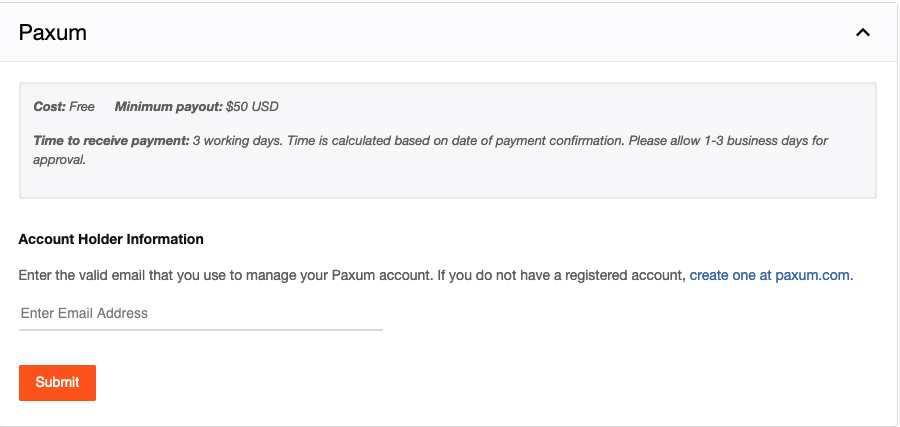
Paxum


 Paxum is now available as a payment method for Broadcasters. Please note the following


FAQ

Can I send funds from my eWallet to my PayPal account?

No, you must have the Paxum card in order to make this transfer.

How soon will new cards be available?

Paxum hopes to have new cards printed and sent out in the next 4-5 weeks.

Are funds loaded to my external card automatically from my Paxum account?

As soon as funds are sent to Paxum, they are loaded into your account. You can log into your Paxum account and see that you received the funds. You can then start a withdrawal to your bank account by wire/eft/sepa or you can withdraw to an external credit card. You can take a combination amount or all and even send funds to another Paxum user.

Can I have a personal account with Paxum if I am from the United States?

Paxum is no longer providing this service to USA Personal Account-Holders however if you have a company, you can open a Paxum Business account or, if that’s not possible, note that you can open an account with Paxum Bank (www.paxumbank.com).

When trying to register information on Paxum they request a series number for my ID; what is this?

Document Number: There are two fields here; Series and Number. If your document does NOT contain a Series, then simply input a hyphen “-” in that field. In the Number section, that is where you will input the number found on your Document (passport number, DL number, etc)

I know that at the moment only the wire transfer is available for Paxum, but can they attach any card that has an IBAN linked to it or is there a list of cards that are accepted or not?

An IBAN is required for withdrawals using bank transfers (wires). Withdrawals using an external credit/debit card requires only the debit/credit card number and information.

Please note: all debit and credit cards are accepted except cards issued by financial institutions in Canada, USA, Israel, and Japan.

What do I fill in for “Source of income”/”Purpose of account”?

Source: “Granity Entertainment”;  Purpose “Receiving Payment

Is there a minimum payout request for Paxum?

Yes, the minimum payment request is $50.00

What documents are needed for Paxum approval?

  1. Residents of an EU country, Canada, Australia or Switzerland need to submit a single ID, such as the International Passport, National ID or Driver’s License and a proof of address showing your last name and the address, issued in the last 6 months.
  2. Residents of all other countries (ex: Russian Federation, Ukraine, Colombia, Philippines, etc.) need to submit an International Passport OR 2 other IDs, such as the National ID, Local Passport (available for Russian Federation and Ukraine citizens) Driver’s License, Voter Card, Military ID or State ID and proof of address showing your last name and the, issued in the last 6 months.

Note: For countries requiring “2” photo ids. If they take a National photo ID to a notary and have the document notarized they will accept just “1” photo identification but it must be with a notary.

Is there a Paxum Office located in Colombia?

Yes, Pereira, Risaralda Colombia. Contact: Colombia@paxum.com (Cristian)

I sent a payment to Paxum, can I get it back?

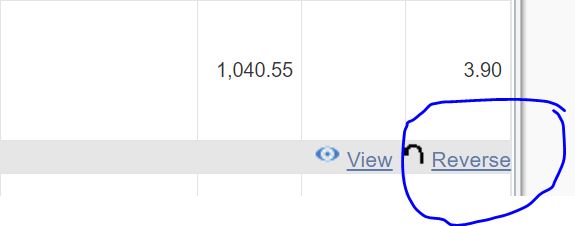
Yes you can
For unverified Paxum accounts. Log in to your Paxum and click the reverse link to the bottom right of the screen

For verified Paxum account holders please contact support@paxum.com


Cash to Tokens

Convert your earnings into CAM4 Tokens to spend on CAM4.

  • Cost: FREE
  • Minimum payment: $0.10 (100 tokens = $10.00)
  • Payment: Immediate

NOTE:As tokens have a cash value the same approval is required as for all payment methods. This approval requires live broadcasts to be completed and the relevant documentation to be uploaded by going to the performer dashboard and following the manage documentation link to provide the necessary documentation for each person appearing on cam

How to request a payment

Make sure you are logged into your CAM4.com account Click the cogwheel in the upper right of your screen and click “Broadcaster Dashboard”.

You will see the following screen

This is your dashboard where you will

  • upload documents for those appearing on cam,
  • Cash out your earnings,
  • see your payment and earning histories.

To request a payment, please click on “CASH OUT” which will show you the following screen:

Euro WireTransfer

  • Cost: Free
  • Minimum payment: $100.00
  • Time to Receive Payment:
    Sepa & Swift payments are now processed DAILY (Monday – Friday).
    Funds requested prior to 23:59 EST will be processed the following business day.
    Please allow an additional 5 – 7 business days for the funds to settle in your account.

Please note

  • When filling out your banking/account information, please do not use special characters (comma, periods, dashes, etc.)
  • NOTE: Your bank (or intermediary bank) may charge you fees in addition to the fees quoted here.
    Fees charged by your bank (or intermediary bank) are not under our control so please consult with your bank prior to requesting a payment if you are unsure.