Boost Engagement With Lovense

Once your Lovense device is connected, CAM4 gives you powerful tools to help you create an interactive show that boosts engagement and tips. This article focuses on how you can use those tools — while directing you to Lovense’s official setup instructions when technical details are needed.

Give Control: Let Viewers Interact in Real Time

The Give Control feature allows viewers to take temporary control of your toy through tipping. This creates a high-engagement experience that often leads to more tips and longer sessions.

Learn how Give Control works through Lovense’s guide:
https://www.lovense.com/cam-model/guides/Give-Control

Dynamic Tip Menus
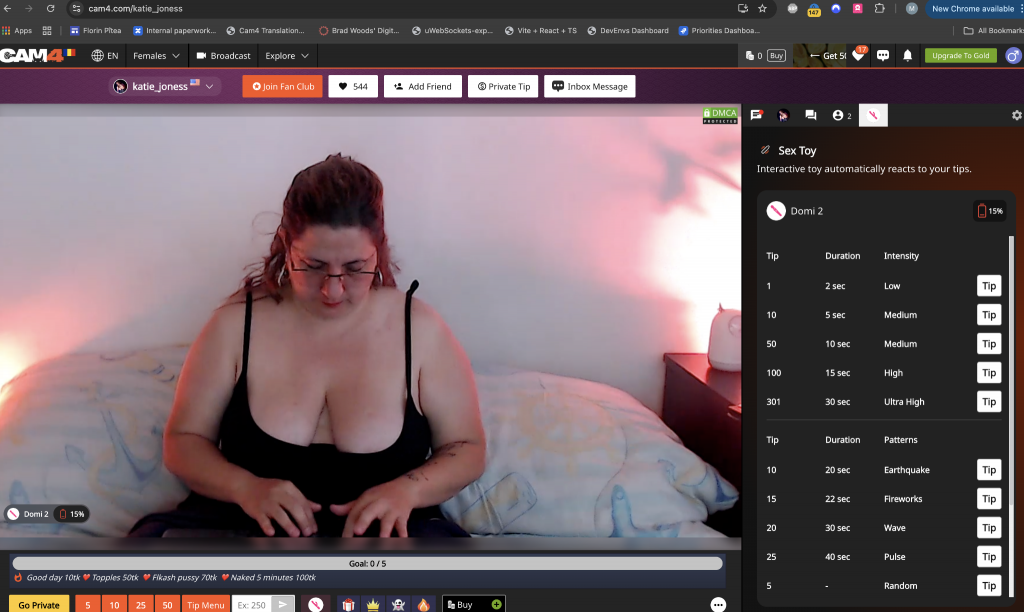
Create customizable vibration levels or patterns tied to specific tip amounts. This allows you to structure your show into tiers — from small buzzes to powerful pulses.

Lovense’s full guide:
https://www.lovense.com/cam-model/guides/Dynamic-Tip-Menu

CAM4’s Built-In Interactivity Features

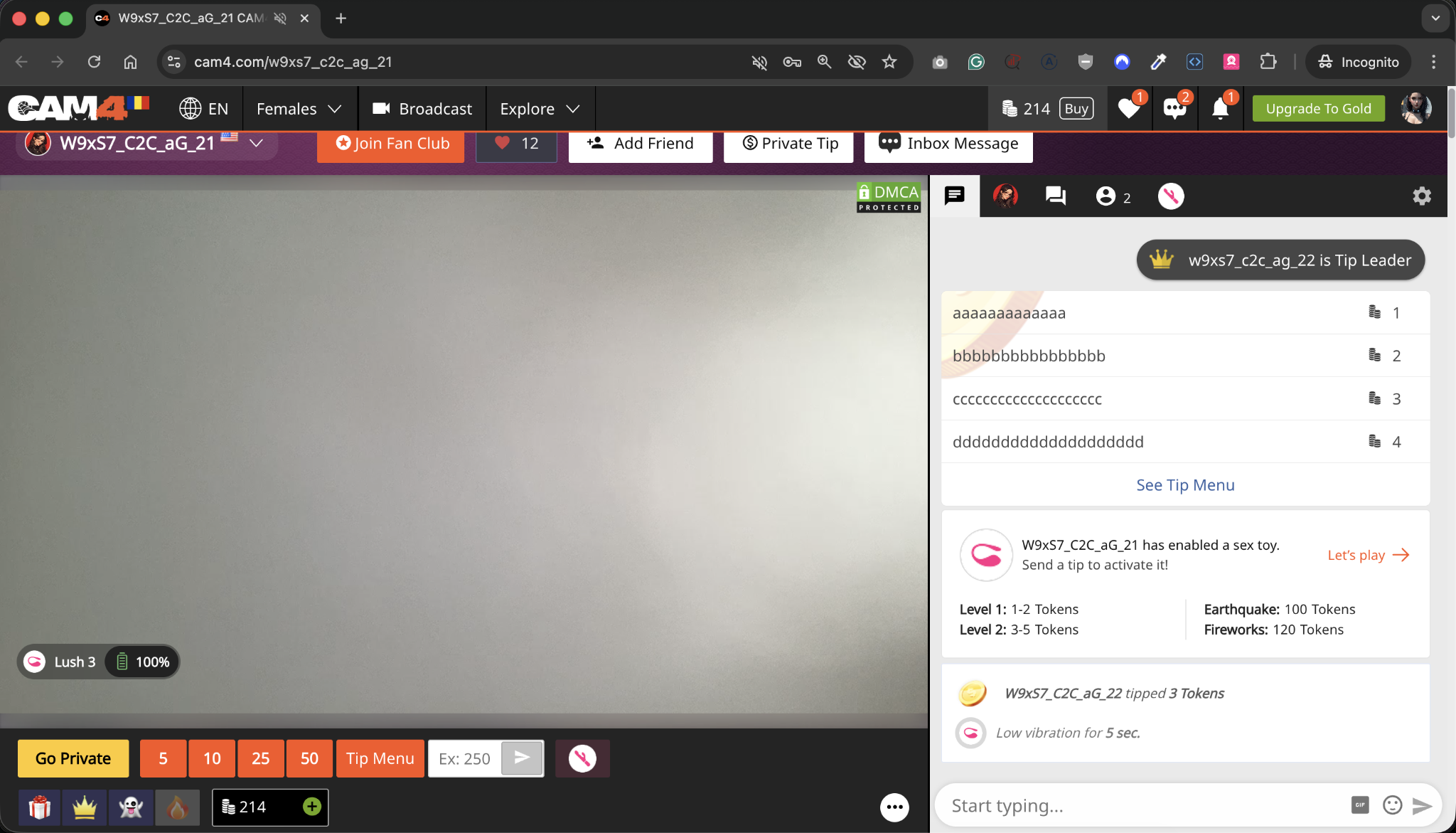
CAM4 enhances the Lovense experience with interactive visual tools that make effects clear for both broadcasters and viewers:

Automatic Chat Notifications

When Lovense is active, CAM4 posts:

  • Announcements letting viewers know your toy is connected
  • Teasers about available tip levels
  • Prompts encouraging engagement

This boosts awareness without extra effort from you.

Special Tip Notifications

Whenever someone activates a vibration level, CAM4 displays:

  • The username of the tipper
  • The amount they tipped
  • A label showing which vibration/level was triggered

This creates a rewarding moment for the viewer and builds excitement in the room.

Toy-Status Widget (Viewer-Side)

This small in-stream element shows:

  • Live toy activity
  • Available levels
  • Clear confirmation when their tip triggers a reaction

It helps viewers understand the experience and participate confidently.

Lovense Button for Viewers

This button opens a streamlined Lovense interface showing:

  • Your configured vibration levels
  • The exact amount required for each
  • A simple way to trigger reactions instantly

This dramatically increases tipping by removing confusion or guesswork.

Tips for Maximizing Engagement

  • Announce your Lovense goals early
  • Use a visible tip menu
  • Let viewers know you are interactive
  • Test your connection before going live
  • Keep your toy charged for longer sessions

Additional Lovense support:

Getting Started With Lovense on CAM4

Using Lovense toys on CAM4 is one of the easiest ways to add interactive excitement to your shows. CAM4 works alongside Lovense technology, so all setup and pairing steps are completed through Lovense’s official apps and guides, ensuring the instructions you follow are always accurate and up to date.

What You Need

To use Lovense on CAM4, you’ll need:

  • A compatible Lovense device
  • A smartphone/tablet with Bluetooth or a computer with a Bluetooth adapter
  • The Lovense Connect App or Lovense browser extension
  • A stable internet connection

Use the links below for the most current setup instructions:

Official Lovense Setup Guides

  • Set up your Lovense toys
    https://www.lovense.com/sextoys/setup
  • Check device compatibility
    https://www.lovense.com/sextoys/compatibility
  • Pair toys with the Lovense Connect App
    https://www.lovense.com/cam-model/guides/Lovense-Connect-App
  • Pair toys with desktop browsers
    https://www.lovense.com/cam-model/guides/PC-Extension

These guides provide detailed instructions and troubleshooting directly from Lovense.

How CAM4 Works With Lovense

Once your toy is paired successfully in the Lovense app or browser extension, CAM4 will automatically detect it through the CAM4 Broadcaster.

After connecting, CAM4 provides several helpful in-stream tools for broadcasters:

Lovense Overlay for Broadcasters

This on-screen overlay shows:

  • The current status of your toy
  • All vibration levels or patterns you’ve configured
  • Live updates as tips trigger different reactions

This helps you keep track of what viewers are activating without switching screens or apps.

Toy-Status Widget on Stream

Viewers also see a small status widget on your stream (bottom-left by default), letting them know:

  • Lovense is active
  • Levels available
  • Real-time activity

This boosts fan interaction because they instantly understand how they can participate.

Lovense Viewer Button

Next to the tipping buttons, viewers now see a Lovense button.
This opens an interactive panel where they can:

  • View your active vibration levels
  • Tip directly for specific toy reactions
  • Understand exactly what their tip triggers

This makes joining in clear and enticing for fans.

For CAM4-specific compatibility info:
https://www.cam4.com/faq/what-devices-work-with-live-touch

Third-Party Apps & Links Policy

To keep CAM4 safe, professional, and supportive of your growth, all interactions and payments need to happen securely on the CAM4 platform. Many third-party apps create risks such as scams, privacy issues, or redirecting fans away from CAM4. This update helps protect both performers and fans while strengthening your earning potential here on CAM4.


Which platforms am I allowed to link on my CAM4 profile?
You may only link the following social media platforms:

  • Instagram

  • Twitter (X)

  • TikTok

  • Bluesky

  • Facebook

These platforms help you promote your brand while still keeping your fanbase connected to CAM4.


Which platforms are NOT allowed?
The following types of platforms cannot be linked or mentioned on your profile, bio, or during streams:

  • Messaging apps (e.g., Telegram, WhatsApp, Signal, Discord, Line, Snapchat)

  • Fan subscription & content sale sites (e.g., OnlyFans, Fansly, FanCentro, LoyalFans, MYM, ManyVids, Clips4Sale, iWantClips, JustForFans)

  • Link-in-bio or link-collection tools (e.g., Linktree, Beacons, AllMyLinks)

  • Any outside payment platforms (e.g., PayPal, CashApp, Venmo, crypto wallets)

Outside payment links of ANY kind are not permitted.


What if I currently have one of these links on my profile?
Please remove all disallowed links before your next stream.
If disallowed links remain, your account may be suspended or permanently banned.


Can I still use those platforms privately?
Yes. You may use any apps privately.
You just cannot link, advertise, or promote them on CAM4.


What happens if I accidentally forget to remove a link?
We strongly encourage you to review your profile before streaming.
If our moderation team finds disallowed links, your account will be flagged, which may lead to suspension or removal from the platform.


Can I accept tips, payments, or donations outside of CAM4?
No. All payments must go through CAM4.
This is for your protection and to ensure safety and compliance.


How does this policy benefit me as a broadcaster?
By keeping your fan interactions on CAM4, you:

  • Maximize earnings directly on the platform

  • Reduce the risk of scams or chargebacks

  • Grow your audience within the CAM4 community

  • Benefit from platform tools designed to help you succeed


If you have questions or need help updating your profile, please contact Support, we’re here to help! 💛