Cam4 FAQ
  • Menu "primary_navigation" not defined.

Cam4 FAQ

Find answers and help fast

How do I change my view or filter broadcasts on CAM4?

You can customize your viewing experience on CAM4 in two ways:

Method 1: Quick Sort Options

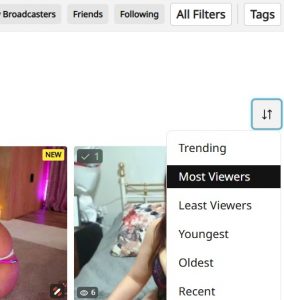
Use the sort and filter controls located in the top right of the page. These provide preset sorting options to quickly change your view:

  • Most Viewers
  • Newest Broadcasters
  • Highest Rated
  • And more filtering options

Method 2: Custom Filters

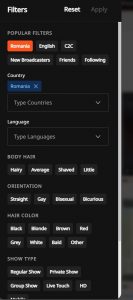
Additional filter options are available in the top right area where you can select your own preferences to create a customized browsing experience by clicking on the “All Filters” button. The filters will appear on the left-hand side:

  • Gender preferences
  • Age ranges
  • Body types
  • Languages
  • Locations
  • And other custom attributes

Last Updated: 3 weeks ago

By Peter Willhelm

  • English
    • Danish
    • Dutch
    • French
    • German
    • Italian
    • Norwegian
    • Polish
    • Portuguese (Brazil)
    • Romanian
    • Russian
    • Spanish
    • Spanish (LA)
    • Swedish

Categories

  • Broadcasting (38)
    • Moderation Tools (1)
  • Cam4 Features (16)
  • General Questions (1)
  • Getting Paid (14)
  • Getting Started (6)
  • Gold Membership (5)
  • Online Safety (7)
  • Studios (3)
  • Technical (5)
    • Your mobile device (1)
  • Tokens (8)
  • Your Account (15)

Legal

  • Terms & Conditions
  • Privacy Policy
  • Statement of Rights and Child Protection

Copyright 2012. Powered by WordPress